
How to Find Content Gaps Using Google Search Console
Discover the search queries your website already appears for, identify pages that are not fully meeting search intent, and turn overlooked opportunities into a more useful SEO content strategy.
A website can receive thousands of Google impressions without attracting the traffic its content deserves. Sometimes the problem is not a lack of topics. It is that existing pages only partially answer the questions people are searching for.
Google Search Console (GSC) can help uncover these opportunities. Its Performance report shows the queries that generate impressions and clicks for your website, along with the pages Google associates with those searches.
By examining this information carefully, you can identify missing subtopics, weak page coverage, overlapping content, and opportunities to improve existing articles before creating another URL.
What Is a Content Gap in SEO?
A content gap is an area of useful information that your website does not adequately cover for a relevant audience or search intent.
For example, imagine a restoration marketing website has an article about water damage restoration SEO. Search Console might show impressions for related searches such as:
- Water damage restoration SEO
- Water restoration SEO
- How to get water damage restoration leads
- How to rank a restoration company in Google Maps
- How to get on an insurance preferred vendor list
These searches may indicate that visitors are interested in several connected subjects. Some may be covered by existing pages, while others may deserve a more detailed explanation or a dedicated article.
The opportunity is not automatically to publish a new article for every query. First, determine whether the existing page answers the searcher's question well.
Three types of content gaps you can investigate
- Topic coverage gaps: Your page discusses a subject but leaves out important related questions or subtopics.
- Search intent gaps: Your page ranks for a query, but its format or depth does not match what the searcher expects.
- Page targeting gaps: Google associates a query with a page that is not the best destination, or several pages appear to compete for similar searches.
Which Google Search Console Metrics Matter?
Start with the Performance report under Search results. Four metrics are particularly useful when evaluating content opportunities.
| Metric | What it tells you | How to use it |
|---|---|---|
| Impressions | How often your website appeared in Google search results. | Find queries and pages receiving visibility. |
| Clicks | How often users clicked through to your website. | Identify which searches and pages attract visitors. |
| Average CTR | The percentage of impressions that resulted in clicks. | Investigate whether titles, snippets, rankings or search intent may need attention. |
| Average position | The average position of your site's highest result for the relevant reporting data. | Identify queries that may have room for ranking improvements. |
Understand the Search Console Performance Report
Before analyzing your own website, it helps to understand how Google presents search performance data. The following video is from Google Search Central.
You can also visit the official Google Search Console Performance report documentation for additional explanations of the report and its dimensions.
How to Find Content Gaps Using Google Search Console: Step by Step
1Open the Performance Report
Log in to Google Search Console and select the correct website property.
In the left-hand navigation, open Performance → Search results. Select Web as the search type if you want to analyze standard Google web search performance.
Choose a date range that provides enough data to identify patterns. Three months is a useful starting point, but a longer period may be more appropriate for websites with low traffic or seasonal search demand.
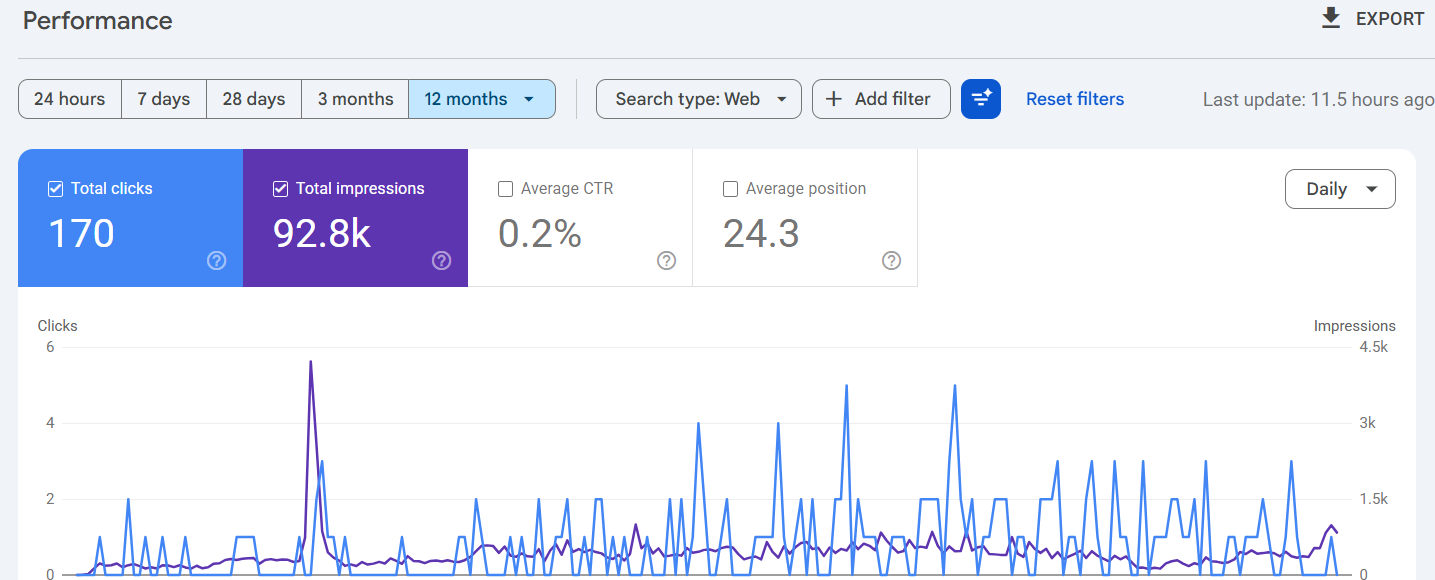
In the example shown, the report displays 170 clicks and 92.8K impressions, with an average CTR of 0.2% and average position of 24.3.
These figures provide context, but they do not identify a content gap on their own. The next step is to examine the actual search queries.
2Examine the Queries Tab
Scroll down to the data table and select Queries.
This report lists search terms for which your website appeared in Google results during the selected period. Review both high-impression queries and less obvious searches that are relevant to your business.
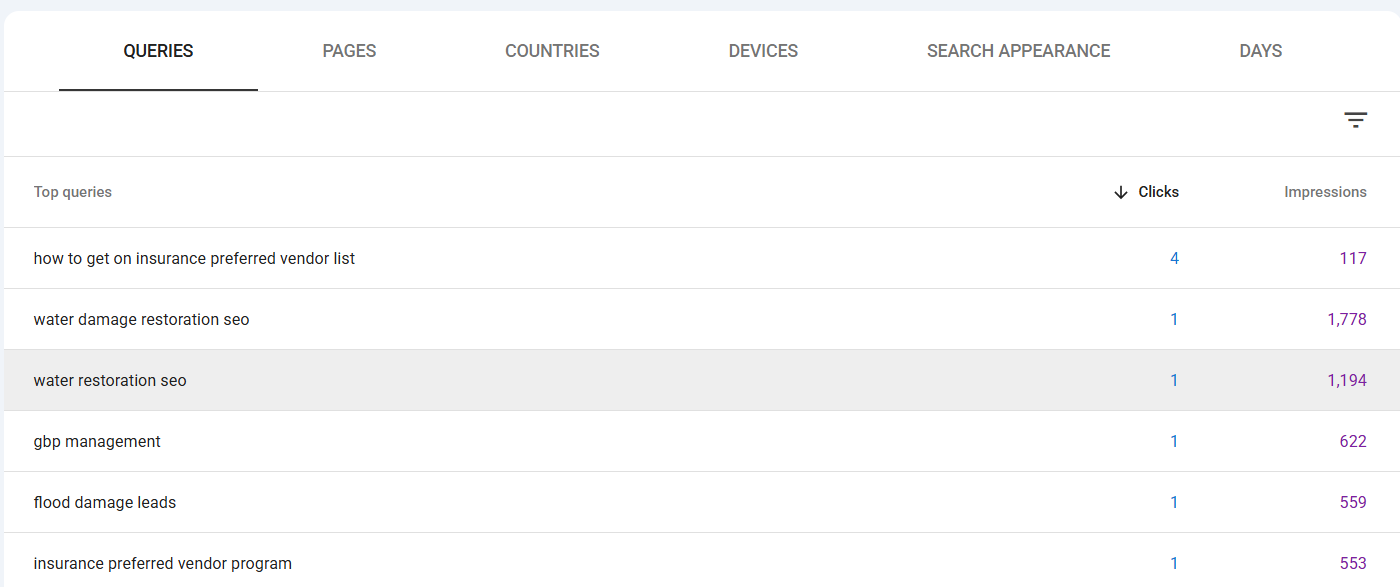
In the supplied example, queries include:
- water damage restoration seo — 1 click and 1,778 impressions.
- water restoration seo — 1 click and 1,194 impressions.
- gbp management — 1 click and 622 impressions.
- flood damage leads — 1 click and 559 impressions.
- insurance preferred vendor program — 1 click and 553 impressions.
These queries reveal several related areas of interest: restoration SEO, Google Business Profile management, lead generation and insurance vendor programmes.
That is useful evidence for planning. However, you still need to determine whether each query belongs on an existing page or requires a different resource.
3Identify Which Pages Receive Search Visibility
Return to the Performance report and select the Pages tab.
This view helps you understand which URLs are receiving impressions and clicks. Compare the pages with the queries you identified in the previous step.
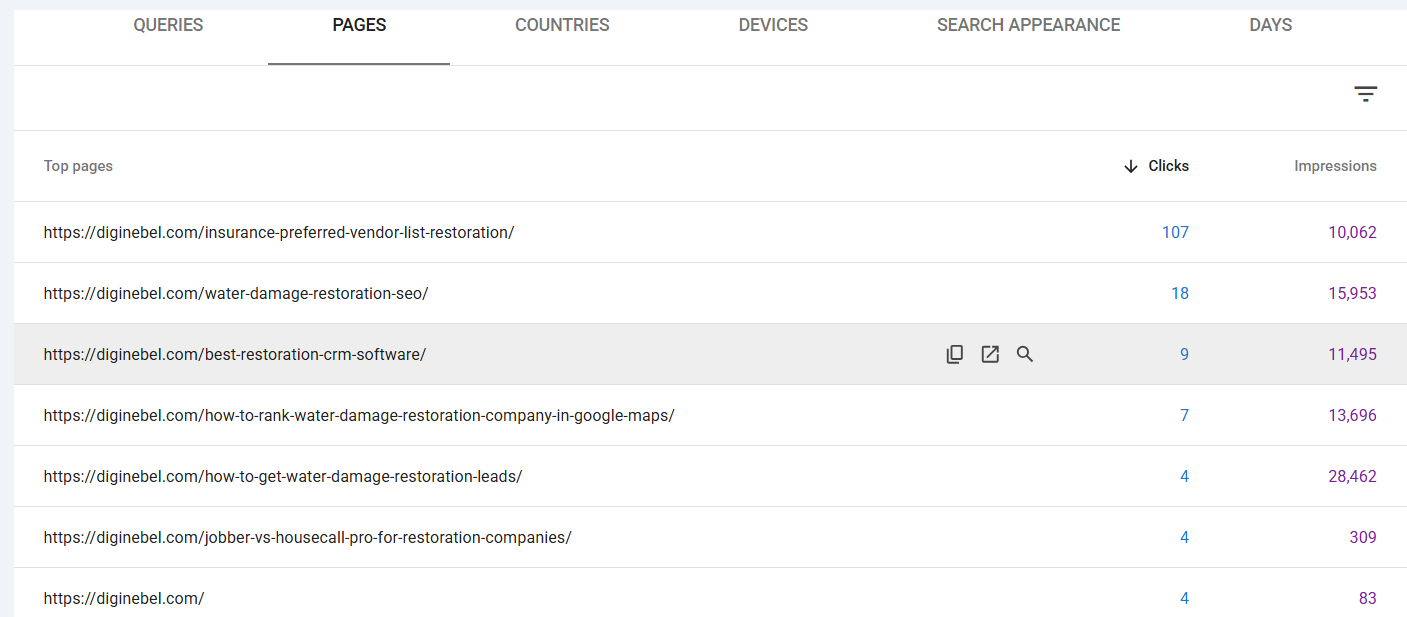
The supplied screenshot shows several Diginebel pages receiving impressions, including:
- Insurance Preferred Vendor List for Restoration
- Water Damage Restoration SEO
- Best Restoration CRM Software
- How to Rank a Water Damage Restoration Company in Google Maps
- How to Get Water Damage Restoration Leads
Notice that some pages receive considerably more impressions than others. This gives you a starting point for deciding which URLs deserve a closer content review.
For instance, a page with many impressions may already cover a topic well but could need better search-intent alignment. Another page may be attracting queries that its current sections do not adequately address.
4Inspect an Individual Search Query
Return to the Queries tab. Click a query that looks relevant to your website and worth investigating.
Search Console will apply a query filter. You can then switch to the Pages tab to see which URLs appeared for that specific search.
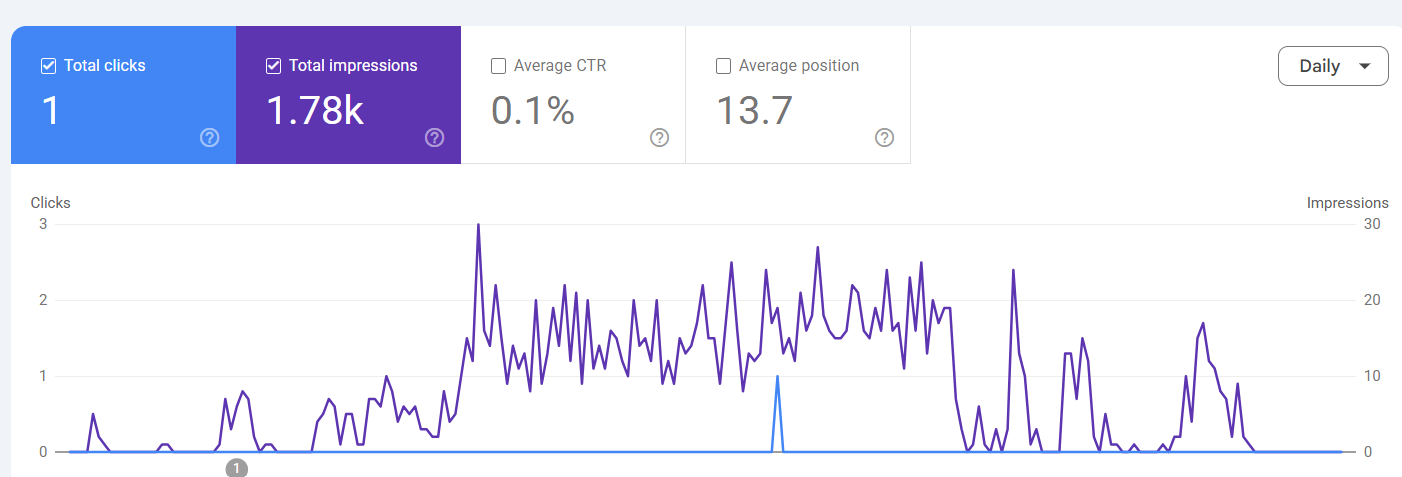
The supplied filtered report shows:
- Total clicks: 1
- Total impressions: 1.78K
- Average CTR: 0.1%
- Average position: 13.7
This combination suggests that the query has generated substantial visibility but very few clicks during the selected reporting period. It deserves investigation, but it does not automatically prove that the page lacks content.
Open the Pages tab while the query filter is active. Check which URL Google associates with that query. Then read the page and compare its content with the searcher's likely intent.
5Compare the Query With the Actual Page
Open the URL identified in the filtered Pages report. Read the page as if you were a visitor who searched for that exact phrase.
Look for missing information in these areas:
- Does the introduction answer the searcher's main question?
- Are important subtopics explained clearly?
- Does the page provide useful examples or practical instructions?
- Are relevant supporting questions answered?
- Are there outdated or incomplete sections?
- Does the page link to useful related resources?
For example, a page about restoration SEO might receive impressions for Google Business Profile management. If the page only mentions GBP briefly, a more complete section explaining profile optimization, categories, service areas and review management may improve its usefulness.
Whether that information belongs on the existing page or a separate guide depends on the search intent and the amount of detail required.
6Check for Overlapping Pages
One query can sometimes be associated with multiple URLs. This is not automatically a problem, but it is worth investigating.
Ask whether the pages serve genuinely different purposes. If two articles target nearly identical searches and answer the same question, their content may overlap unnecessarily.
Consider these possible actions:
- Improve the stronger page and add missing information.
- Clarify the purpose and search intent of each page.
- Combine substantially overlapping content when doing so creates a better resource.
- Use internal links to connect related articles with distinct purposes.
Do not delete or merge URLs simply because they appear for the same query. Review traffic, backlinks, conversions, content quality and search intent before making structural changes.
7Turn Findings Into Content Opportunities
After reviewing the query, the associated URL and the page content, classify the opportunity.
Most findings fit into one of four categories:
- Improve an existing page: The topic is relevant, but the page needs better coverage or clearer explanations.
- Add a missing section: A related question deserves a useful explanation within an existing article.
- Create a new article: The query represents a distinct topic or search intent that deserves its own resource.
- Take no action: The query is irrelevant, too ambiguous or already adequately covered.
This classification prevents a common SEO mistake: creating a new URL for every variation of a keyword.
How to Prioritize Content Gap Opportunities
Not every opportunity deserves the same amount of effort. Prioritize topics based on relevance, business value, current visibility and the quality of the existing page.
| Opportunity | What to investigate | Potential action |
|---|---|---|
| High impressions, low clicks | Position, search intent, title and snippet, SERP features. | Review the page and search result before editing. |
| Relevant query, weak page coverage | Missing explanations, examples or supporting information. | Improve the existing article. |
| Distinct topic with no suitable URL | Whether the search intent differs from existing pages. | Consider a new article. |
| Several URLs for similar searches | Overlap, purpose and performance of each page. | Clarify, consolidate or differentiate where appropriate. |
| Irrelevant search queries | Whether the impressions relate to your intended audience. | Usually no content action is needed. |
Use a simple priority score
You can score each opportunity from 1 to 5 across four factors:
- Relevance: How closely does the topic match your audience?
- Business value: Could the topic attract useful leads, customers or qualified visitors?
- Content gap: How much useful information is currently missing?
- Opportunity: Is there a realistic reason to expect that improving the page could help?
Add the four scores to create a simple internal priority ranking. This is a planning method, not a Google ranking formula.
Practical Example: Finding Content Gaps on a Restoration Marketing Website
Consider a website that publishes marketing resources for water damage restoration companies. Its Search Console data contains impressions for several related searches.
| Search query | Existing relevant page | What to investigate |
|---|---|---|
| Water damage restoration SEO | Water Damage Restoration SEO | Does the guide cover technical SEO, local visibility, service pages and keyword research? |
| Water restoration SEO | Water Damage Restoration SEO | Does the existing article address the same intent, or is another audience being served? |
| GBP management | Google Maps SEO guide | Does the page adequately explain profile management and optimization? |
| Flood damage leads | Restoration lead generation guide | Does it explain lead sources, qualification and conversion? |
| Insurance preferred vendor program | Insurance preferred vendor guide | Does it explain application requirements and the vendor relationship process? |
In this example, several searches already have relevant pages. The first action should be to inspect those pages, not automatically publish five new articles.
If the GBP-related section is incomplete, improving the existing Google Maps guide might be the better decision. If the insurance vendor query has a distinct informational intent, its dedicated guide may be the right destination.
This approach helps build a connected content library rather than a collection of thin articles targeting slightly different keyword variations.
How to Organize Your Content Gap Findings
A spreadsheet makes the analysis easier to maintain. Export your Search Console data and use columns such as these:
| Column | Information to record |
|---|---|
| Search query | The exact query from Search Console. |
| Clicks | Clicks during the selected date range. |
| Impressions | Impressions during the selected date range. |
| CTR | Click-through rate. |
| Average position | Average reported position. |
| Associated URL | The page shown for the filtered query. |
| Search intent | Informational, commercial, transactional or navigational, as appropriate. |
| Identified gap | The missing or weak content area. |
| Recommended action | Update, expand, create, consolidate or no action. |
| Priority | Your internal priority score. |
| Status | Not started, in progress or completed. |
Keep the date range and export date with your working records so that future comparisons use consistent reporting periods. You do not need to display those dates in the published article.
Review changes after making improvements
After updating a page or publishing a genuinely new resource, return to Search Console and monitor the relevant queries and URLs.
Compare similar reporting periods where possible. Look for changes in impressions, clicks, CTR and average position, while accounting for seasonality and other changes in search demand.
Search Console data can take time to reflect changes. Avoid making repeated edits based on a few days of movement.
Common Mistakes When Finding Content Gaps With GSC
1. Publishing an article for every query
Keyword variations do not necessarily represent separate topics. Group related searches and examine their intent before deciding to create another URL.
2. Treating low CTR as proof of poor content
CTR is affected by ranking position, search-result features, title presentation and the searcher's expectations. Check the actual search results before changing the page.
3. Ignoring the Pages tab
Queries alone do not tell you which page should be improved. Use the filtered query and Pages tab together to identify the URL Google associates with a search.
4. Confusing your own content gaps with competitor gaps
Search Console only reports performance data for your property. It does not reveal every topic covered by competitors. Use competitor research separately when you need that comparison.
5. Ignoring anonymized queries and reporting limitations
Some queries are omitted from Search Console reports for privacy reasons. Exported data and report totals may also differ because of reporting limitations. Do not assume that the visible query list contains every search that generated an impression.
Google explains these limitations in its Performance report documentation.
6. Changing URLs without evaluating their value
Before deleting, redirecting or merging a page, check its existing search performance, backlinks, internal links and business value. A content improvement does not automatically require a URL change.
Frequently Asked Questions
Can Google Search Console find content gaps?
Google Search Console can help identify potential content gaps by showing the queries that generate impressions for your website and the pages associated with those searches. It does not automatically produce a complete content gap report or compare your content with competitors.
How do I find keywords that my website is already ranking for?
Open Search Console, select Performance → Search results, and review the Queries tab. The report shows queries for which your website appeared in Google search results during the selected period, along with available performance metrics.
How do I find pages ranking for a specific keyword in Google Search Console?
Open the Performance report and select Queries. Click the search query you want to investigate. With the query filter applied, select the Pages tab to see the URLs associated with that search.
Does high impressions and low CTR mean I have a content gap?
Not necessarily. It may indicate an opportunity to review the title, description, ranking position, search-result features or search intent. Read the page and inspect the actual search results before deciding whether the content needs improvement.
Should I update an existing article or publish a new one?
Update an existing article when the query shares its main search intent and the missing information fits naturally into that resource. Consider a new article when the query represents a distinct topic that deserves its own detailed answer.
How often should I perform a content gap analysis?
For many websites, reviewing Search Console data monthly or quarterly is a practical starting point. More frequent reviews may be useful after a major content update or website change, but avoid reacting to short-term fluctuations without enough data.
Can I use Google Search Console for competitor content gap analysis?
No. Search Console reports your own property's performance. To compare your coverage with competitors, you need separate competitor research using search results and appropriate SEO research tools.
Final Takeaway
Google Search Console is valuable for finding content opportunities because it reveals what people already search for when your website appears in Google results.
Start with the Performance report, examine relevant queries, identify the pages associated with those searches, and inspect the actual content. Then decide whether the best action is to improve an existing article, add a missing section, create a separate resource or leave the page unchanged.
The objective is not to publish more URLs. It is to make your existing content more useful and ensure that important search questions have the right destination on your website.
For more practical SEO and digital marketing guidance, explore the Diginebel resource library.